
KOL meetings on the calendar without the email thread
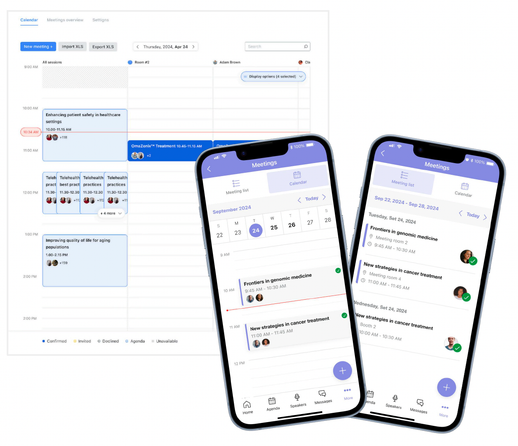
Coordinating KOL meetings at a congress means chasing availability across time zones, double-booked rooms, and a spreadsheet that is stale by Monday. With Onomi, KOLs pick their own slots from branded availability campaigns, rooms and calendars reconcile automatically, and every held meeting lands in the CRM.
Runs at congresses and staffed meeting suites today, with ad hoc advisor touchpoints at advisory boards and the org-wide calendar in Onomi 360 MeetingsEQ.
How congress scheduling actually feels
Availability by reply-all
Fifty meeting requests, each a thread: the MSL proposes three slots, the KOL's assistant counters, the thread forks. The person coordinating spends the congress week in their inbox.
Two sources of truth for one room
The suite calendar lives in one spreadsheet, participant calendars in Outlook, and neither knows about the other. Double bookings surface when two meetings arrive at the same table.
The itinerary is stale by breakfast
Printed schedules are wrong by the first reschedule. Reps improvise, meetings are missed, and nobody records what actually happened, so the CRM shows a congress that never took place.
How it works
Availability campaigns instead of threads
Outreach goes out branded and signed by the meeting owner, and each KOL self-schedules on a form whose slots you control. Automated reminder cadences chase the non-responders, and campaigns batch above 250 requests, so a top-20 congress program is a send, not a mail merge.
Rooms and calendars reconciled
Participant availability comes in however it exists: fixed hours, an Excel share, or a two-way Outlook and Google sync. Room capacity and blocked slots sit in the same calendar, so a double booking is impossible to save rather than embarrassing to discover. No-shows and reschedules are handled as states on the meeting, and an exception desk picks up what automation should not.
The meeting day, orchestrated
Every participant starts the day with a morning itinerary of their back-to-back schedule. Executive briefings are bulk-generated from approved templates and enriched with live data, and staffed-suite check-in writes attendance to the CRM in real time, so the debrief starts from what happened, not from memory.
Coordination beyond the suite
The same machinery runs ad hoc advisor touchpoints at advisory boards, with calendar blockers protecting advisor time between sessions. And because held meetings write back, the org-wide calendar in Onomi 360 shows which KOL met whom, at which congress, across every team that scheduled.
Featured services
Software is half of it. These are the services our team delivers around this capability.
Concierge exception desk
Reschedules, walk-ins, and the KOL whose flight moved: our coordinators work the exceptions during the congress so your team stays in the meetings.
Delivery & services →Onsite delivery teams
Staffed meeting-suite check-in run by trained event specialists, with attendance flowing to the CRM while the meeting is still going.
Delivery & services →24/7 support
Product support around the clock during congress week, in the time zone the congress is in.
Delivery & services →Where this stops
Your calendars stay the source of truth
Outlook and Google stay where scheduling lives for your people. Onomi syncs two-way rather than replacing them, and removing the sync removes nothing from your calendars.
Not a KOL database
Outreach runs against the target lists and KOL data you already license. Onomi schedules the meetings; it does not sell you the people to meet.
"KOLs will not log into another portal to pick a slot."
There is no portal and no password. The KOL gets a branded email signed by the person they know, taps a magic link, and picks a slot on one page. The friction stays on our side of the table.
Frequently asked questions
How do KOLs pick their slots?
From an availability form reached by magic link, no login or app required. The form shows only slots that work for the requested participants and rooms, and a booking confirms instantly with add-to-calendar for both sides.
What happens on a no-show or a reschedule?
Both are meeting states, not deletions. A reschedule re-checks rooms and participant availability before it saves, reminders re-issue automatically, and a no-show stays on the record so follow-up and reporting reflect what actually happened.
Does attendance really reach the CRM during the congress?
Yes. Staffed-suite check-in writes attendance to the meeting record in real time, and the CRM sync carries it to the account timeline, so a rep can see this morning's held meetings before the afternoon ones start.
Can medical and commercial teams share the same suite calendar?
Yes, with visibility rules. Rooms and capacity are shared so the physical suite never double-books, while meeting details stay scoped to the team that owns them.
Related pages
Walk through one congress day of back-to-back KOL meetings
Bring your last congress's meeting count. We will run the same volume through availability campaigns, the suite calendar, and morning itineraries, down to the CRM record a held meeting leaves behind.
Request a demo